On this page
How to get your ticket
- 1
Sign in to your profile
Use the account you registered with. The username and password for the test itself are a separate pair, and they arrive on the ticket.
- 2
Open Exam Credentials
The section holds the login for the examination and the ticket that goes with it.
- 3
Press Download Entry Ticket, then print it
Print the sheet rather than keeping it on your phone. Read the centre, the session and the date off it as soon as it comes out.
What the ticket says
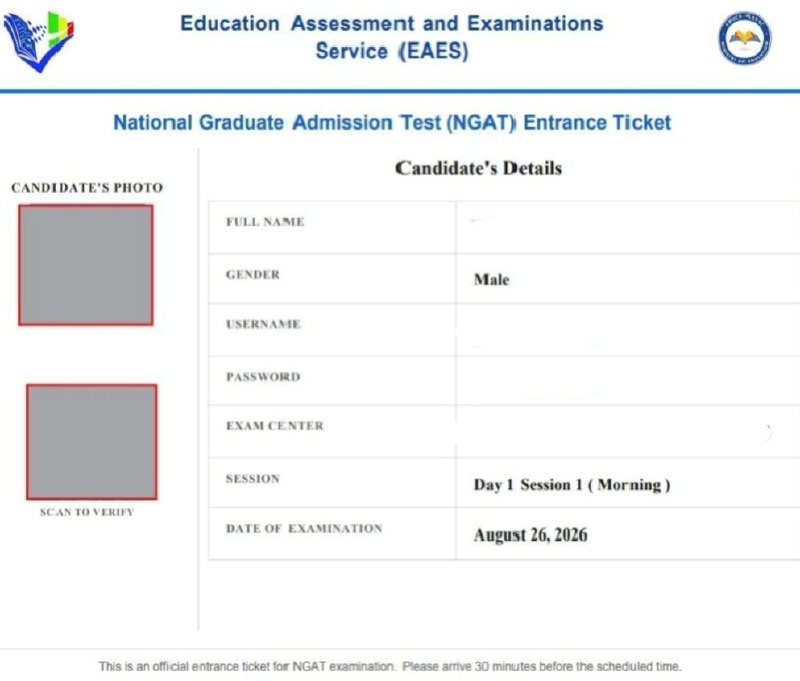
The sheet is issued by the Education Assessment and Examinations Service and is headed National Graduate Admission Test Entrance Ticket. It carries your photograph, a QR code to scan for verification, and a table of your details.
- Full name and gender
- The username and password you will use to sit the test
- Your examination centre
- Your session, written as a day and a sitting, for example Day 1 Session 1 in the morning
- The date of your examination
Check the centre even if you know the university
Registration was handled at every public university, but only some of them were selected to run the test, so candidates who signed up at one that was left out have been moved to another campus. The centre printed on your ticket is the one to plan around, and the background is in some NGAT candidates have been moved to a different university.
Sources
Every figure and date above comes from one of these. Open them; a story about your child's school is worth checking.